

What Are the Principles of Design?
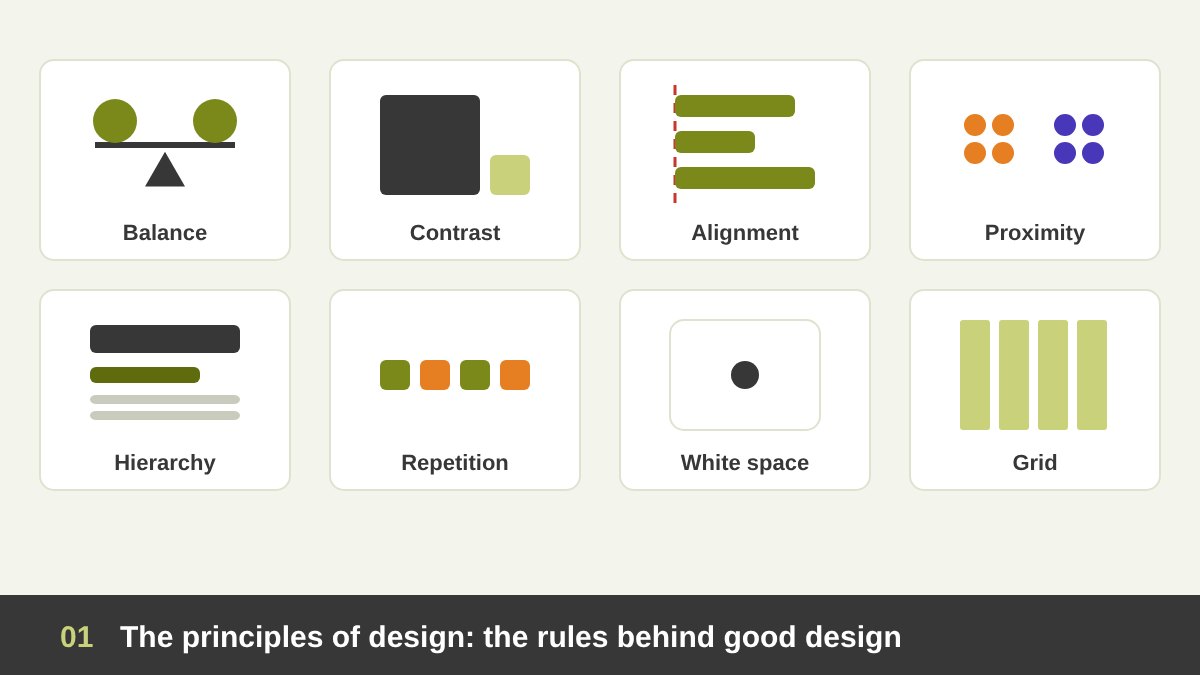
Every good poster, logo, website or book page you have ever admired follows a set of rules, even if it looks effortless. Those rules are the principles of design: the guidelines that decide how visual parts are arranged so the result is clear, attractive and does its job. They are not a modern invention. Egyptian wall paintings, Islamic geometric patterns, Renaissance page layouts and Swiss posters all use the same ideas of balance, rhythm, proportion and order, as I explain in Art vs Design. Software changes every year; these principles do not.
In many years of teaching, art directing and reviewing other designers’ work, I have noticed that most weak designs do not fail because of bad taste. They fail because one or two principles are broken: there is no clear focal point, the elements are not aligned, or everything is crowded together. Once you can name the principle, you can fix the problem in minutes. This guide covers all the fundamental principles of design, from balance and contrast to Gestalt, grids, typography and context, with a simple test for each one. Colour theory is a big subject of its own, so it gets its own article soon. Here is the short version:
Key takeaways
- The elements of design (point, line, shape, texture, space, type) are the raw material. The principles are the rules for arranging them so a design communicates.
- Every layout should answer one question first: where does the eye go, and in what order? Contrast, emphasis, scale and hierarchy exist to control that answer.
- Order comes from alignment, proximity, repetition and the grid. They make a design feel calm, related and trustworthy, even when the viewer cannot say why.
- White space is not empty space. It is an active element that groups, separates, focuses attention and signals quality.
- No principle works without context: the audience, the culture, the language direction, the medium and the goal decide which rules matter most, and when to break them.
The Elements of Design: The Raw Material You Arrange
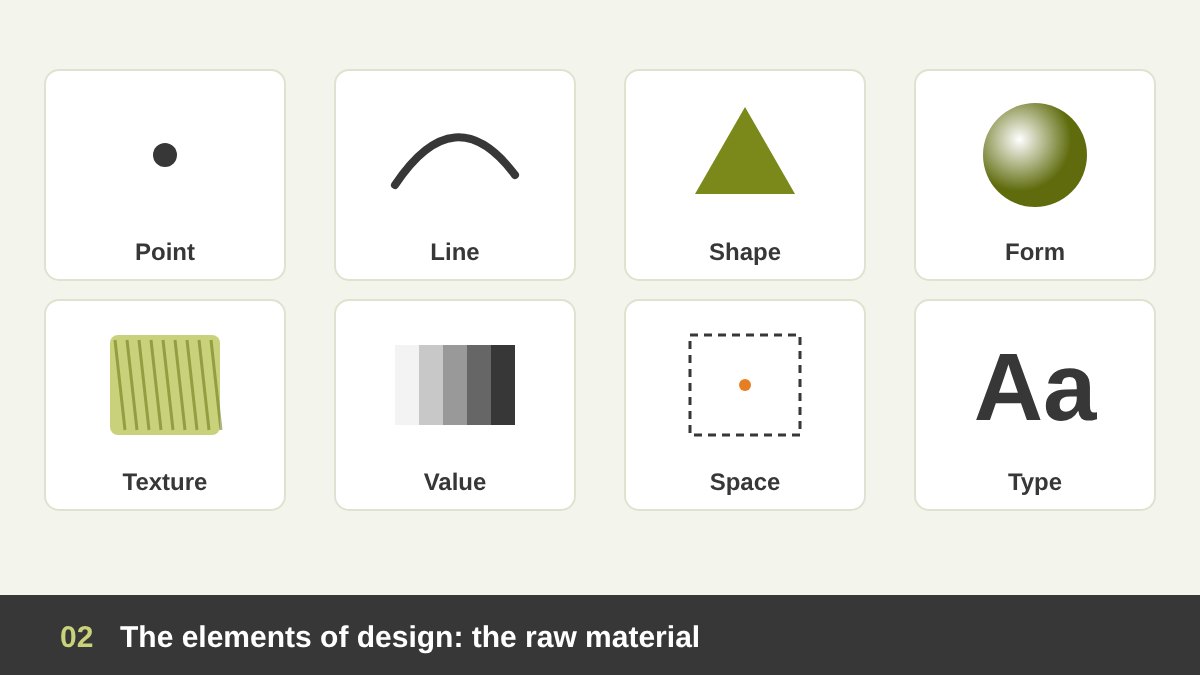
Before the principles, you need to know what they act on. The elements of design are the basic building blocks of every visual. A point is the smallest mark and instantly attracts attention. A line connects, divides, directs the eye and carries emotion: straight lines feel stable, curves feel soft, diagonals feel energetic. A shape is a closed area: geometric shapes (circles, squares, triangles) feel organised and modern, while organic shapes feel natural and human. Form is a shape with depth, created with light, shadow and perspective.
Texture is how a surface feels or looks like it would feel: the grain of paper, the brush stroke in a painting, the noise in a photo. Value is how light or dark something is, and it is one of the strongest tools you have; a good design should still work when you turn it to black and white. Space is the area around and between elements. Type is text as a visual element, with its own shapes and rhythm. And colour is an element too, with its own theory of harmony and meaning, which I will cover in a separate article. The principles below are simply the rules for arranging these elements well.
Balance: Distributing Visual Weight
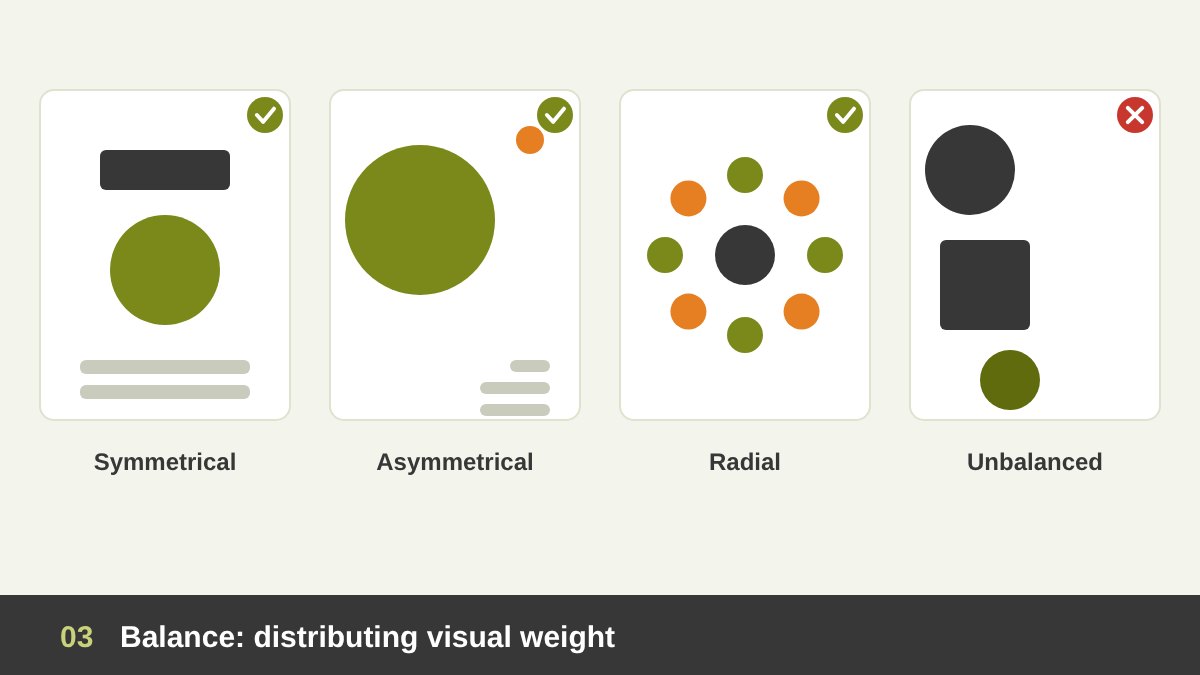
Every element in a design has visual weight: how strongly it pulls the eye. Large elements are heavier than small ones, dark heavier than light, saturated heavier than muted, complex heavier than simple, and an isolated element heavier than one in a group. Balance is the distribution of that weight so the layout feels stable and nothing seems to fall off the page. A design without balance feels uncomfortable, even if the viewer cannot explain why.
There are four main types. Symmetrical balance mirrors the elements on both sides of a central axis; it feels formal, calm and traditional, which is why it suits invitations, institutions and luxury brands. Asymmetrical balance uses different elements of equal weight, such as one large photo balanced by a block of small text and generous white space; it feels dynamic and modern. Radial balance arranges elements around a centre, like a rose window, a clock or many emblem logos. Mosaic balance spreads many equal elements evenly with no clear focal point, as in patterns and some photo walls. A quick test: squint at your layout. If one side feels heavier and you did not plan it, move or resize something.
Contrast: Making Differences Obvious
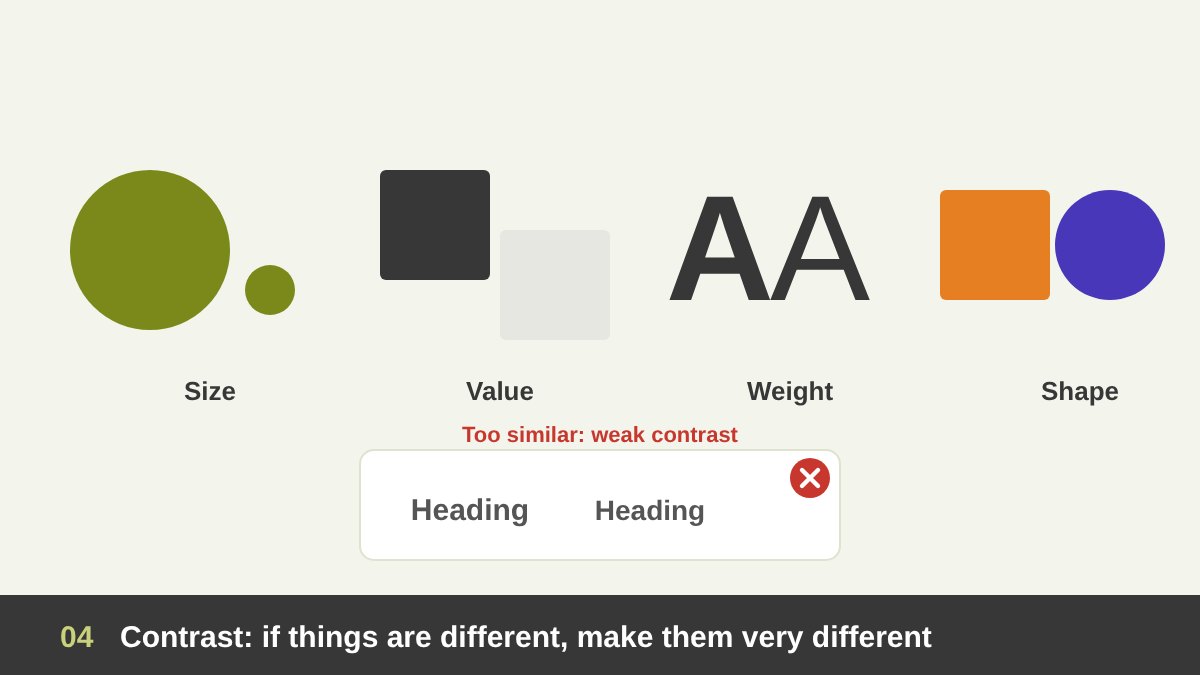
Contrast is the difference between elements, and it is how the eye understands what is important, what belongs together and what to read first. You can create contrast with size (big against small), value (dark against light), weight (bold against thin type), shape (round against angular), texture (rough against smooth), direction (vertical against horizontal) and density (busy against empty). Colour contrast is also important, and we will look at it in the colour article.
The golden rule of contrast is: if things are different, make them very different. A heading that is 18 pixels next to body text that is 16 pixels does not look like a heading; it looks like a mistake. Make it 36. A dark grey next to a slightly darker grey reads as dirty, not as intentional. Weak contrast is one of the most common problems I see in student portfolios. Contrast is also an accessibility issue: text with low contrast against its background is hard to read for many people, especially on phones in sunlight. Strong, deliberate contrast makes a design both more beautiful and more usable.
Emphasis: Creating a Focal Point
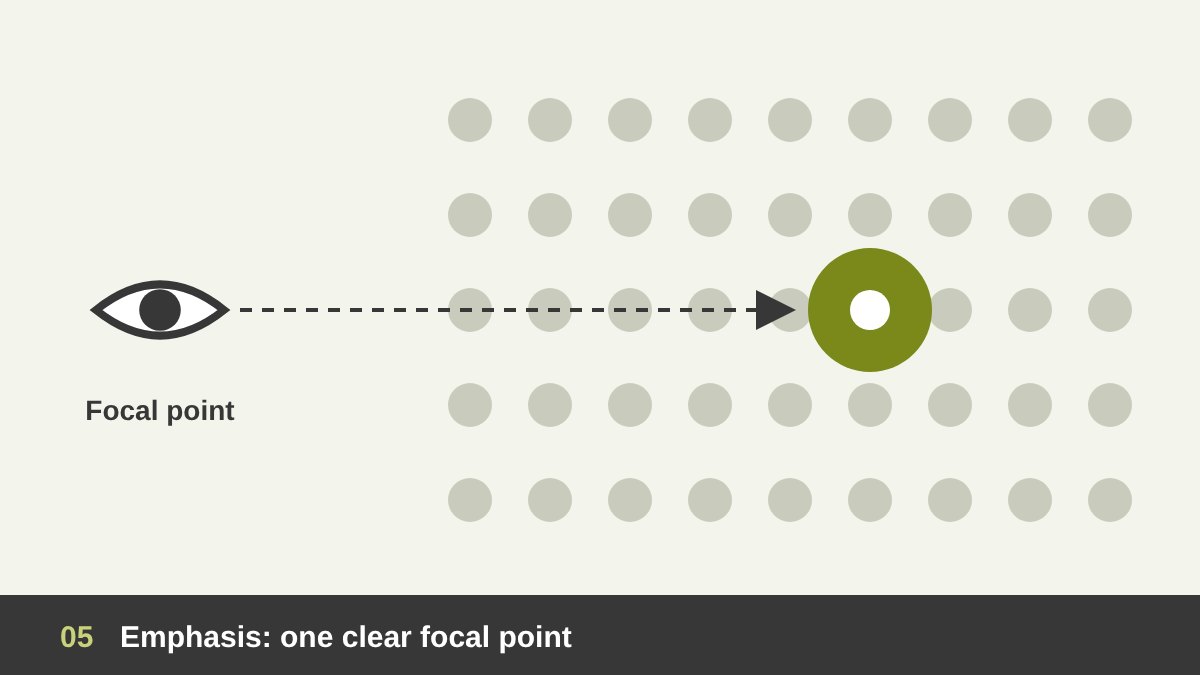
Emphasis is the principle of making one element the star. Every design needs a focal point: the first thing the viewer sees, and usually the most important message, such as the product, the headline or the call to action. You create emphasis with contrast (one bright element among neutral ones), size (the largest element wins), isolation (an element surrounded by empty space), position (the centre or the upper area of the page), direction (lines and gazes that point to it) and difference (one element that breaks a pattern).
The most common mistake is trying to emphasise everything. When the client wants the logo bigger, the price bigger, the phone number bigger and the offer bigger, nothing stands out anymore and the design shouts without saying anything. If everything is important, nothing is important. Choose one primary focal point, maybe one or two secondary ones, and let the rest support them quietly. Handling that conversation with clients is a skill in itself, which I discuss in When to Say No as a Designer.
Visual Hierarchy: Controlling the Reading Order
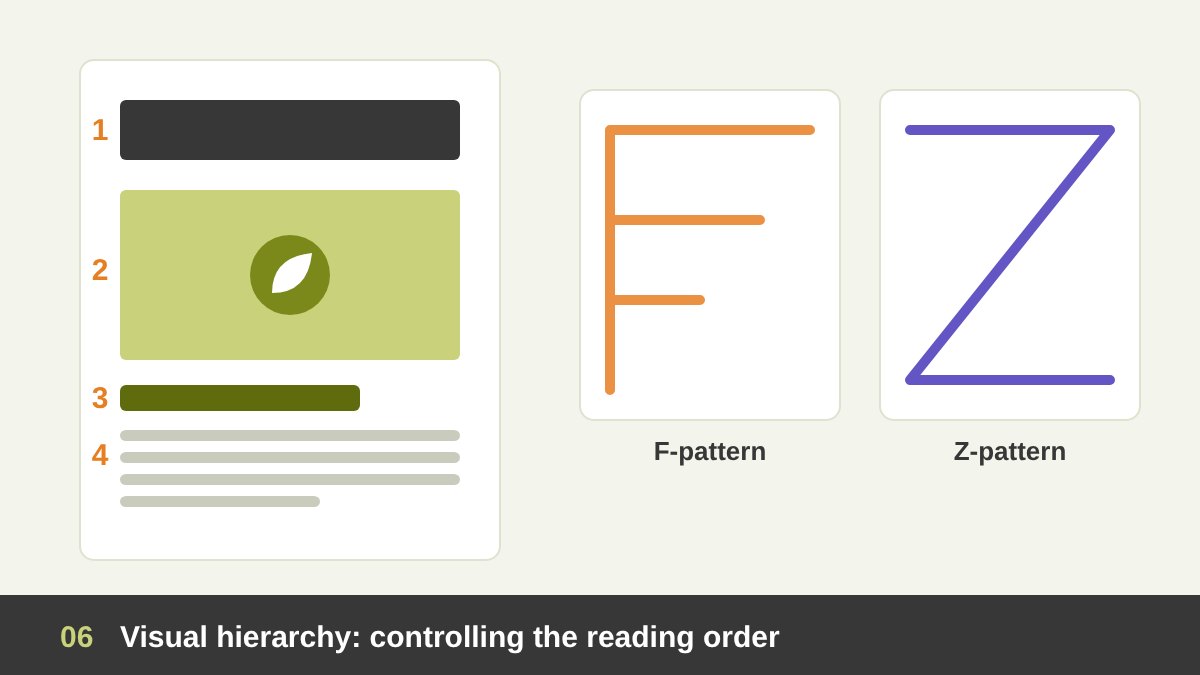
If emphasis decides what comes first, visual hierarchy decides what comes second, third and last. It is the arrangement of elements by importance so the viewer reads the design in the order you planned. A good poster usually has three levels: the primary level grabs attention (the headline or main image), the secondary level explains (subheading, key details), and the tertiary level gives the rest (body text, small print, contact details). You build these levels with size, weight, colour, position, spacing and style.
Hierarchy also follows how people naturally scan. In left-to-right languages, readers of text-heavy pages often scan in an F-pattern: across the top, then down the left side. On simpler layouts, such as posters, ads and landing pages, the eye tends to follow a Z-pattern: top left, top right, diagonally down, then across the bottom. In Arabic and other right-to-left languages, these patterns are mirrored, and they start from the top right. A simple test for hierarchy: show your design to someone for five seconds, then ask what they remember. If they remember the wrong thing first, your hierarchy needs work.
Alignment: The Invisible Lines That Create Order
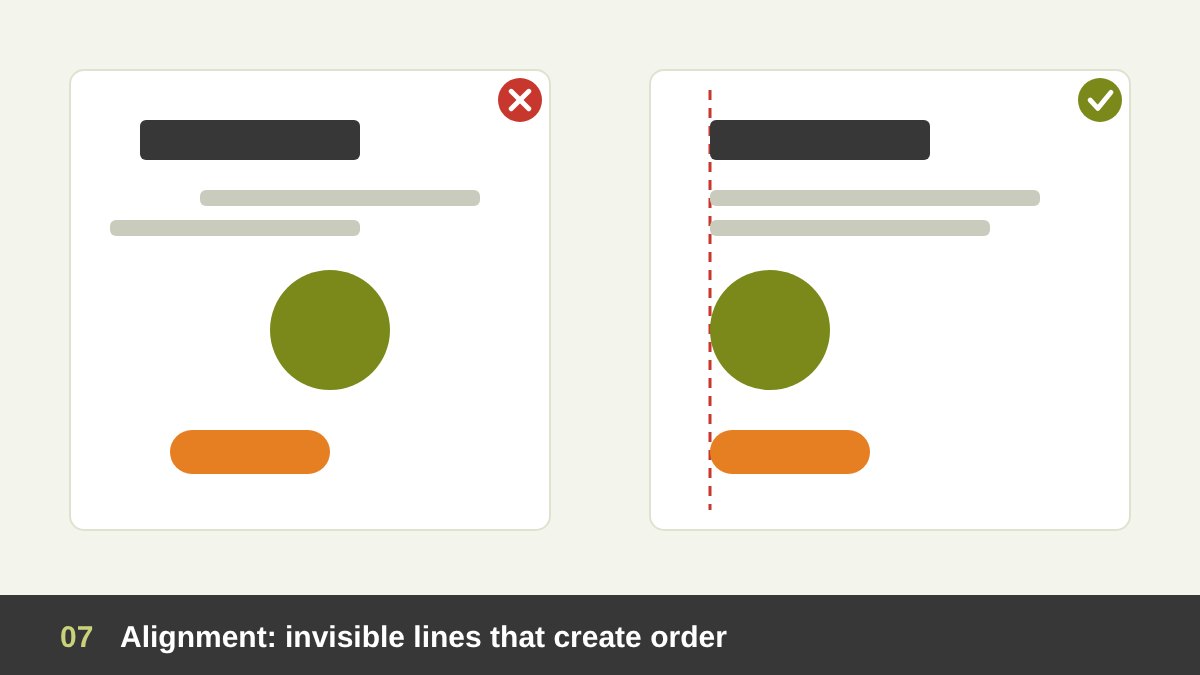
Alignment means placing elements so their edges or centres line up along invisible lines. It is the easiest principle to apply and the fastest way to make a design look professional. When elements are aligned, the eye connects them, and the layout feels organised and intentional. When they are placed “roughly in the right area”, the design looks careless, even if every individual element is beautiful. As the designer Robin Williams says in her classic book on design basics, nothing should be placed on the page arbitrarily; every element should have a visual connection with something else.
There are several types: left, right and centre alignment for text and objects, top, middle and bottom alignment for elements in a row, and edge alignment, where images, text and buttons share the same outer edges. Choose one strong alignment and stick to it; mixing centred and left-aligned text on the same page usually looks weak. Centred text feels formal but is harder to read in long paragraphs. And remember optical alignment: round letters, triangles and quotation marks sometimes need to hang slightly outside the line to look aligned, because the eye judges mass, not geometry.
Proximity: Grouping What Belongs Together
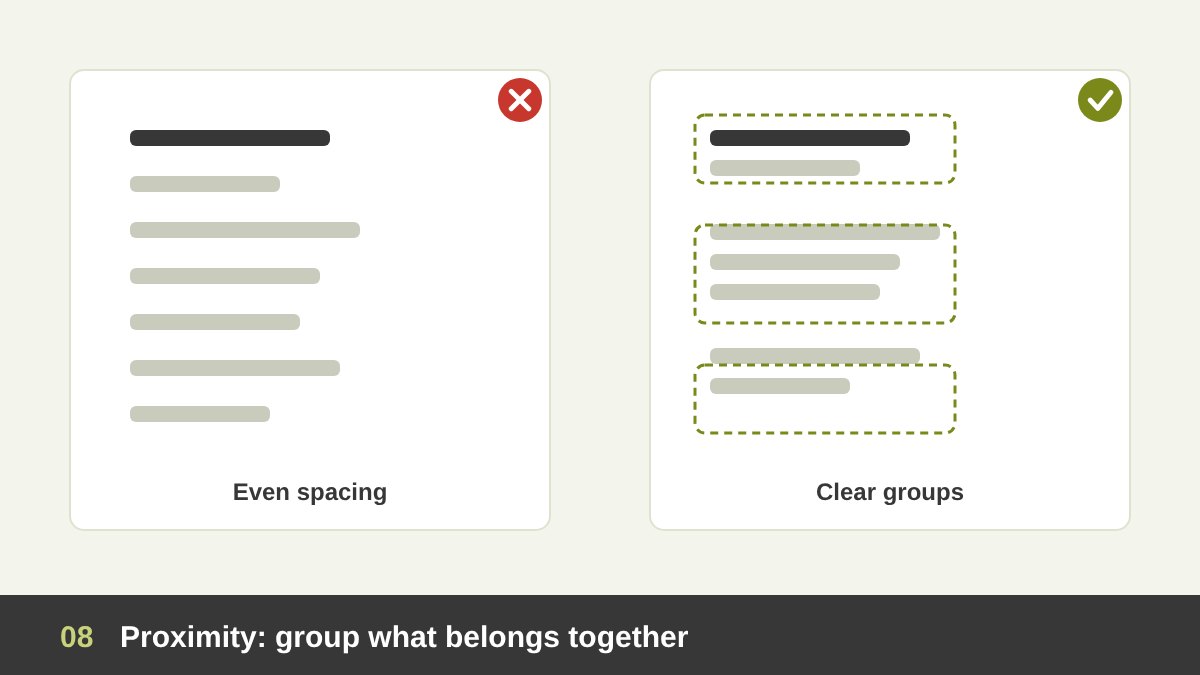
Proximity is simple: items that are close to each other are seen as related, and items that are far apart are seen as separate. The brain groups things by distance before it even reads them. That means spacing is not decoration; it is information. A photo caption placed closer to the photo below it than to its own photo will confuse the reader. A form label that sits halfway between two fields will make people fill in the wrong box.
Use proximity to organise content into clear groups. On a business card, keep the name and title together, the phone, email and website together, and the address separate. On a web page, the space between sections should be clearly larger than the space within a section. A practical rule I give junior designers: decide your spacing values in advance (for example 8, 16, 24, 48 and 96 pixels), and use the small values inside groups and the large values between them. You will reduce visual clutter immediately, often without removing a single element.
Repetition and Consistency: Building a Visual System
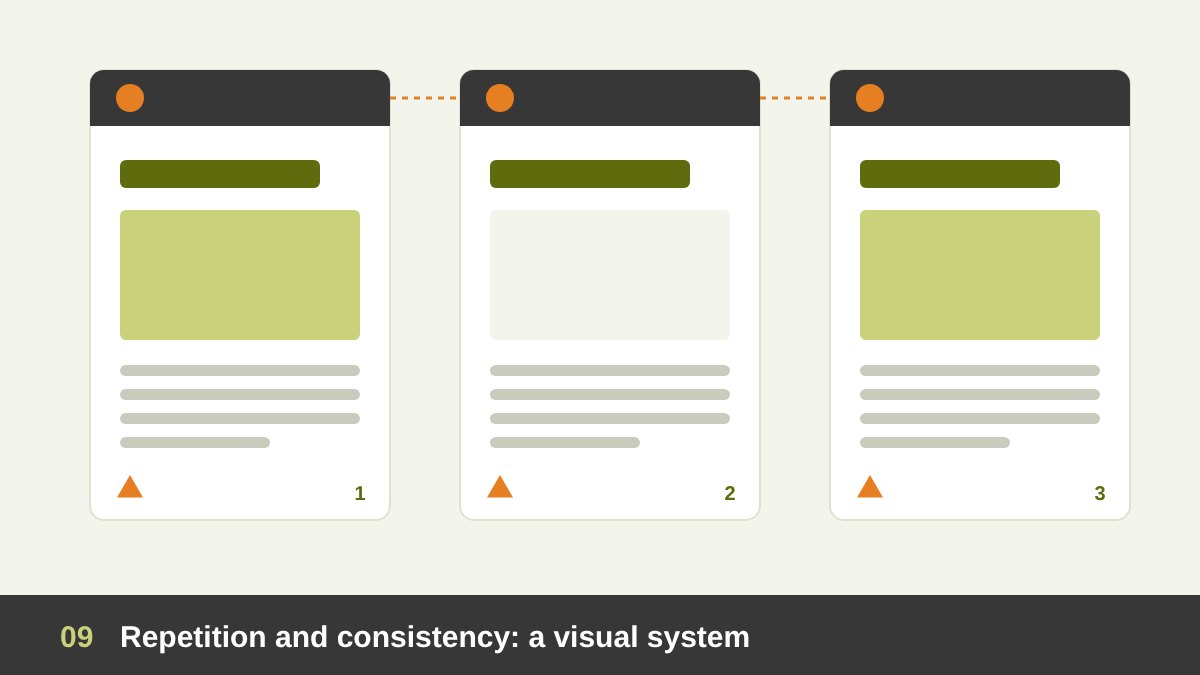
Repetition means reusing the same visual elements throughout a design: the same fonts, the same colours, the same spacing, the same icon style, the same shape of buttons. It ties the parts together and creates consistency, which makes a design feel unified and makes it easier to use. When every page of a brochure has the same header style, the reader stops thinking about the layout and focuses on the content. When every button on a website looks the same, users know instantly what is clickable.
Repetition is the heart of every brand identity. A logo alone does not make a brand; the repeated use of its colours, typography, graphic elements and tone across every touchpoint does, as I explain in Branding vs Logo Design. It is also the idea behind design systems and style guides: decide once, then repeat. Repetition does not mean boredom. Repeat the structure and vary the content, and you get a design that is both consistent and alive. A good test: cover the logo. Can you still recognise which brand the design belongs to?
Rhythm and Pattern: Repetition With a Beat
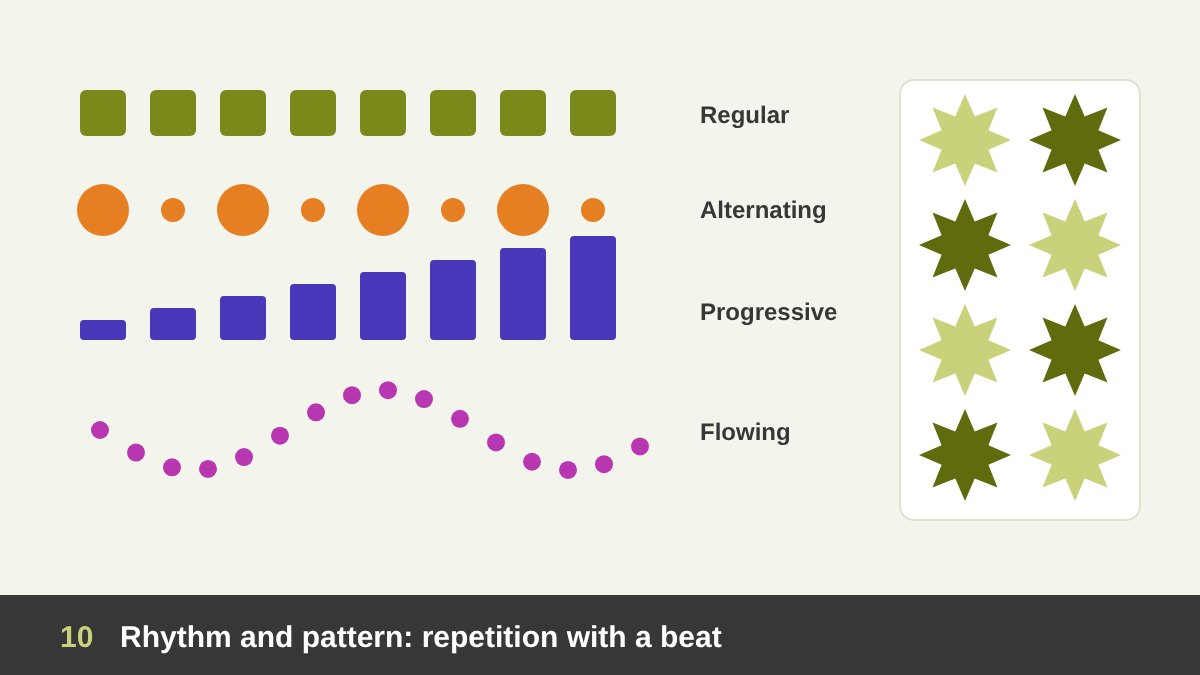
When repetition is organised in time and space, it becomes rhythm. Just like in music, visual rhythm is created by repeating elements with specific intervals, so the eye moves through the design with a beat. Regular rhythm repeats the same element at equal intervals, like columns in a building or posts in an Instagram grid. Alternating rhythm switches between two or more elements, like a big image then a small one. Progressive rhythm changes the element gradually, getting bigger, darker or closer step by step. Flowing rhythm follows organic curves, like waves or sand dunes.
Pattern is rhythm that covers a surface: the repeated motif on packaging, a textile, a background or a tile. Islamic geometric art is one of the richest examples in history, building endless variety from a few repeated shapes. In layouts, rhythm keeps long content interesting. A website with every section in the same layout feels monotonous; alternating image left and image right, or changing the section background every few blocks, keeps the visitor scrolling. Rhythm is also why a breathing space after a dense section feels so good: the pause is part of the beat.
Movement: Guiding the Eye Through the Design
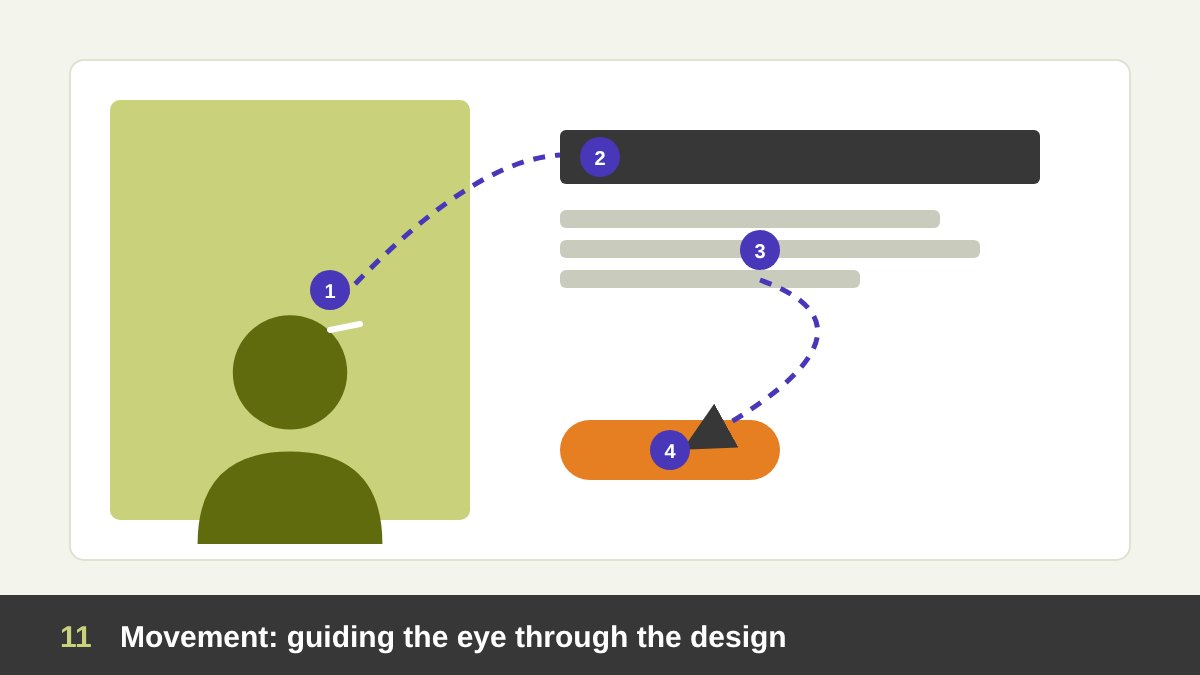
Movement is the path the viewer’s eye takes through a design. A static image can still have strong movement if it is designed well. You create it with leading lines (roads, arms, edges, arrows), directional cues (a person looking or pointing towards the headline), diagonals, which feel more energetic than horizontals, curves, a sequence of sizes from large to small, and the reading direction of the language. Even the gaze of a person in a photo is powerful: viewers tend to follow where the eyes look.
Plan the journey on purpose. Decide the entry point (the focal point), the stops along the way (secondary information) and the exit (often the call to action, the logo or the contact details). Then check that nothing pulls the eye out of the design too early, such as a model looking off the edge of the page or a strong line pointing to empty space. In motion design, video and UI animation, movement becomes literal, and the same principle applies: every motion should guide attention towards something, not just decorate. The design trends of 2026 use a lot of motion, but the best examples still follow this rule.
White Space: The Most Underrated Element
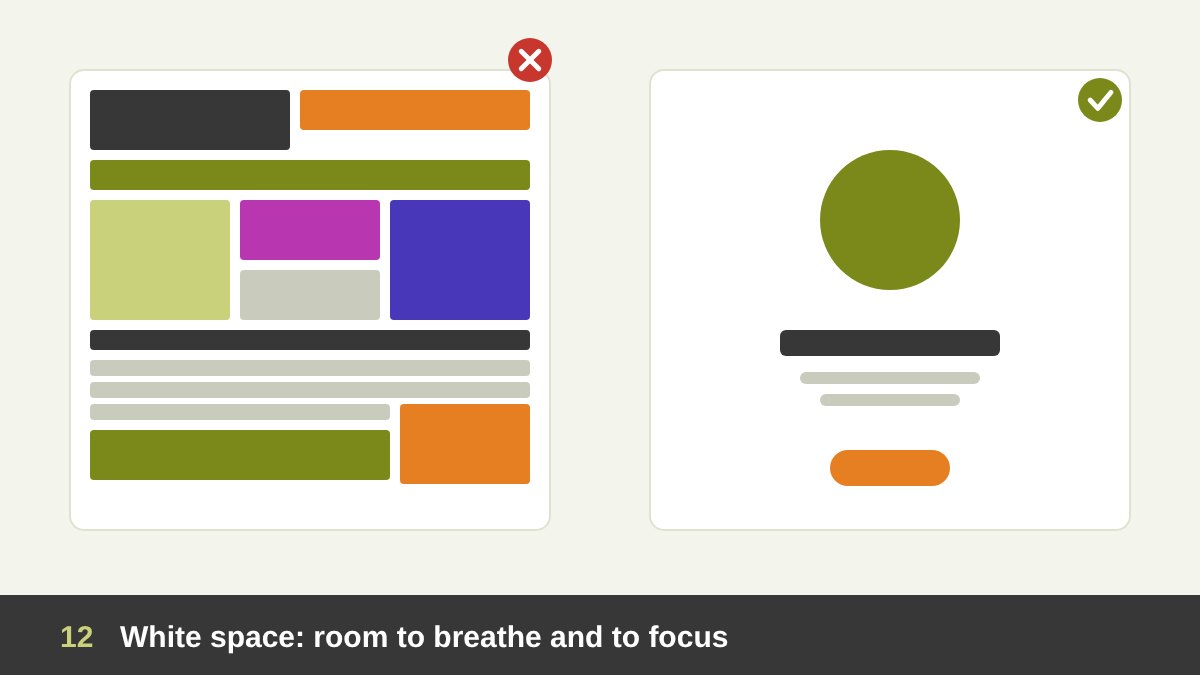
White space, also called negative space, is the empty area between and around elements. It does not have to be white; it is simply space without content. Beginners often see it as wasted space and try to fill it. Experienced designers see it as one of their most powerful tools. White space separates and groups (it is how proximity works), it focuses attention (an element surrounded by space becomes a focal point), it improves readability, and it communicates quality. Compare a luxury brand’s ad with a supermarket flyer: the difference is mostly space.
Think of white space at two levels. Macro white space is the large space: margins, the gaps between sections, the breathing room around a logo. Micro white space is the small space: between lines of text, between letters, between an icon and its label. Both matter. Negative space can also carry meaning: the hidden arrow between the E and the x in the FedEx logo is a famous example of figure-ground design, where the empty space forms a second image. When a client says a design “looks empty”, it is often the white space that is making it look expensive. Defend it, and show the crowded version side by side if you need to.
Scale and Proportion: Size Relationships That Feel Right
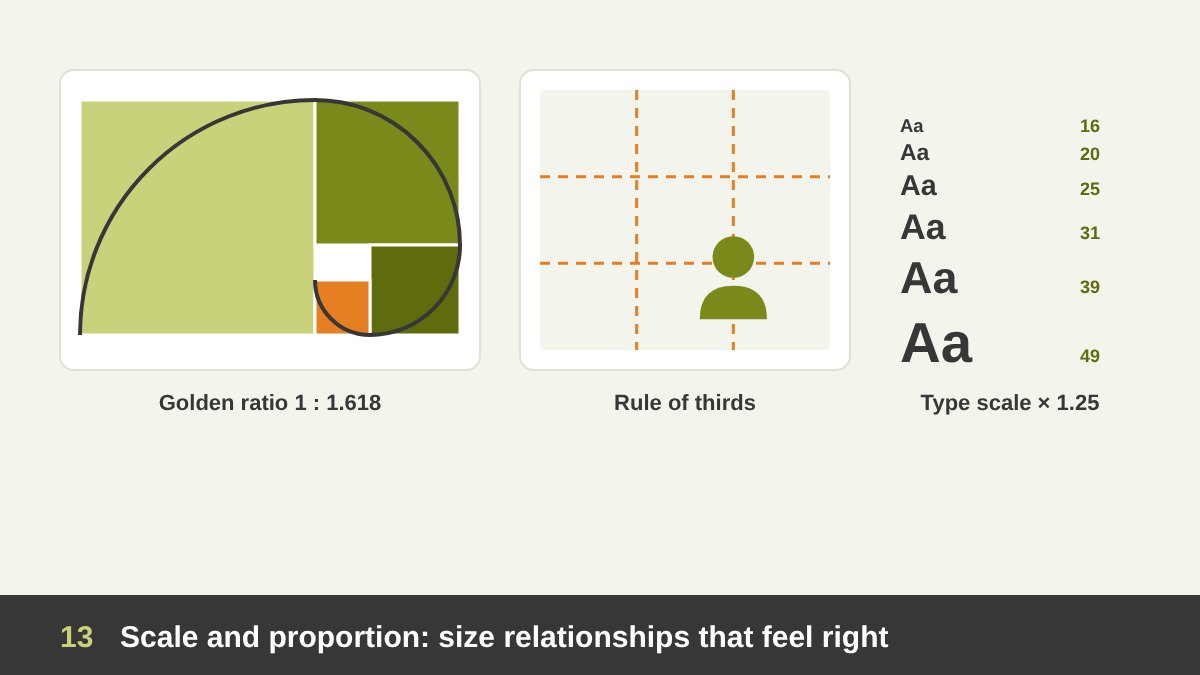
Scale is the size of an element compared to others or to the real world, and proportion is the size relationship between parts of a whole. Scale creates drama and hierarchy: a huge headline next to tiny text feels bold and editorial; a tiny product in a large empty space feels precious. Unexpected scale, like a giant coffee cup next to a building, instantly gets attention. Proportion creates harmony: when the parts relate to each other in a consistent way, the whole feels “right”.
Designers use a few classic systems. The golden ratio (about 1 : 1.618) appears in architecture, art and many layouts and logos; it is useful as a guide, not a magic formula. The rule of thirds divides a frame into a 3×3 grid and places the subject on one of the intersections, which usually feels more dynamic than the exact centre; it is a basic rule in photography and composition. In typography, a modular type scale multiplies sizes by a fixed ratio (for example 16, 20, 25, 31, 39 pixels with a ratio of 1.25), so every heading level relates to the others. Whatever system you choose, the point is the same: sizes should be decided, not guessed.
Unity and Variety: One Design, Not a Collection of Parts
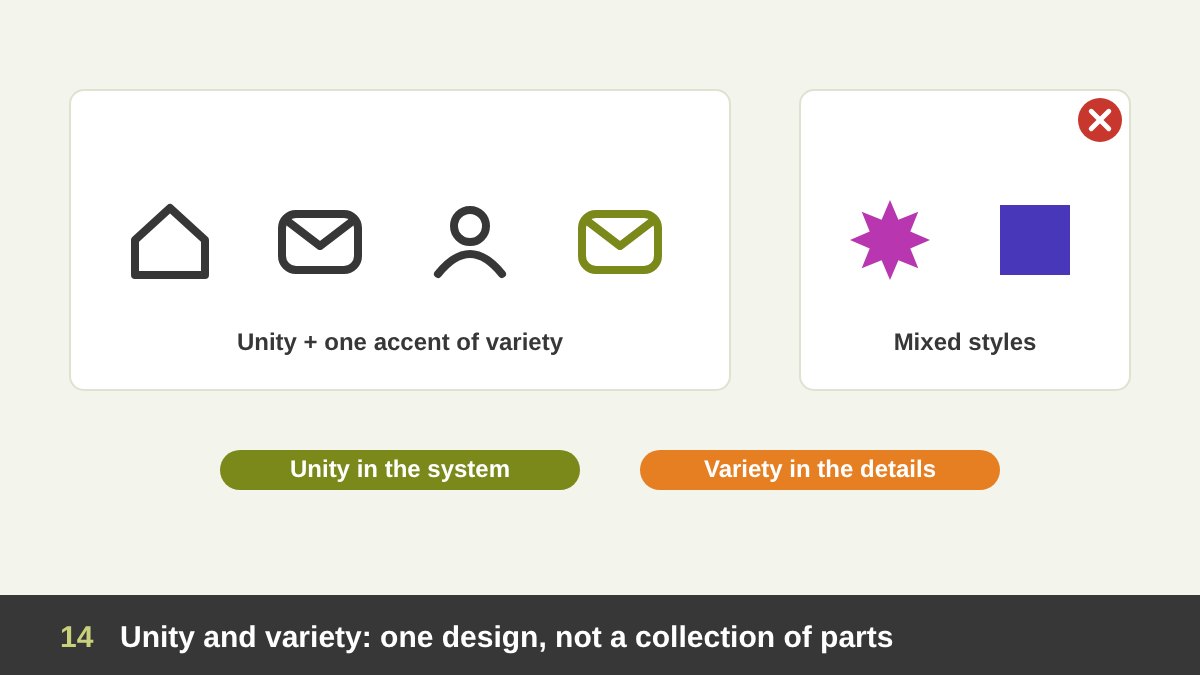
Unity, sometimes called harmony, is the feeling that all the parts of a design belong together and form one whole. It is the result of all the other principles working together: consistent alignment, related proportions, repeated styles, a limited set of fonts and a clear visual language. When unity is missing, a design looks like a collage of elements from different projects, such as three unrelated fonts, icons from two different sets and photos in different styles. The viewer feels the confusion even if they cannot name it.
But too much unity becomes boring. That is where variety comes in: controlled differences that add interest, such as one accent colour, one illustrated element in a photographic layout, or a change of rhythm halfway through a page. The balance between the two is what makes a design feel both coherent and alive. A practical way to think about it: unity in the system, variety in the details. Keep the grid, fonts and style consistent, and let a few carefully chosen elements break the pattern on purpose.
Gestalt Principles: How the Brain Sees Wholes
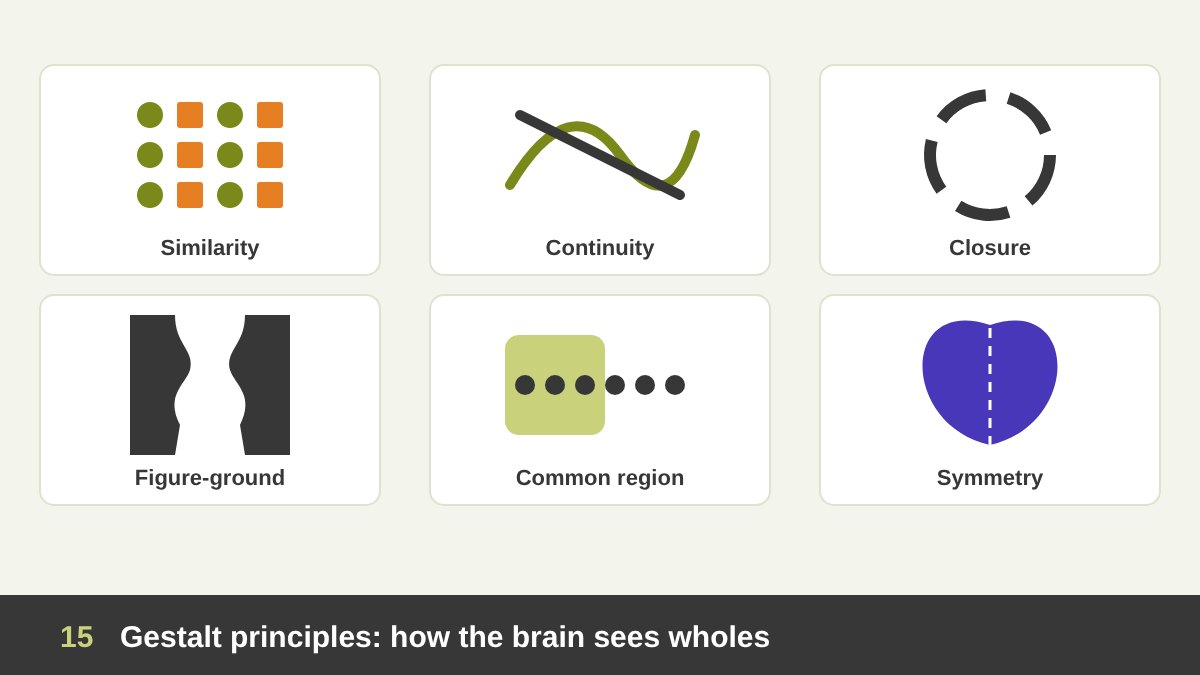
Gestalt psychology was developed in Germany in the early twentieth century by psychologists such as Max Wertheimer, Wolfgang Köhler and Kurt Koffka. Its main idea is that we see the whole before the parts: the brain automatically organises what we see into groups and patterns. The key Gestalt principles give designers a scientific explanation for many of the rules above. Proximity: close elements form groups. Similarity: elements that share a shape, colour, size or texture are seen as related. Continuity: the eye follows lines and curves and prefers smooth paths over sudden changes. Closure: the brain fills in missing parts and sees complete shapes, which is why the WWF panda works with so few lines.
Figure-ground: we separate an object (the figure) from its background (the ground), and clever designs can make both readable, like the famous vase that is also two faces. Common region: elements inside the same box or background area are seen as a group, which is why cards work so well in interfaces. Common fate: elements that move in the same direction are seen as related, important in animation and UI. Symmetry and order (also called Prägnanz, or simplicity): the brain prefers the simplest, most stable interpretation of a shape. Gestalt is especially powerful in logo design, where one simple mark must hold several meanings.
Grids and Layout: The Structure Behind the Page
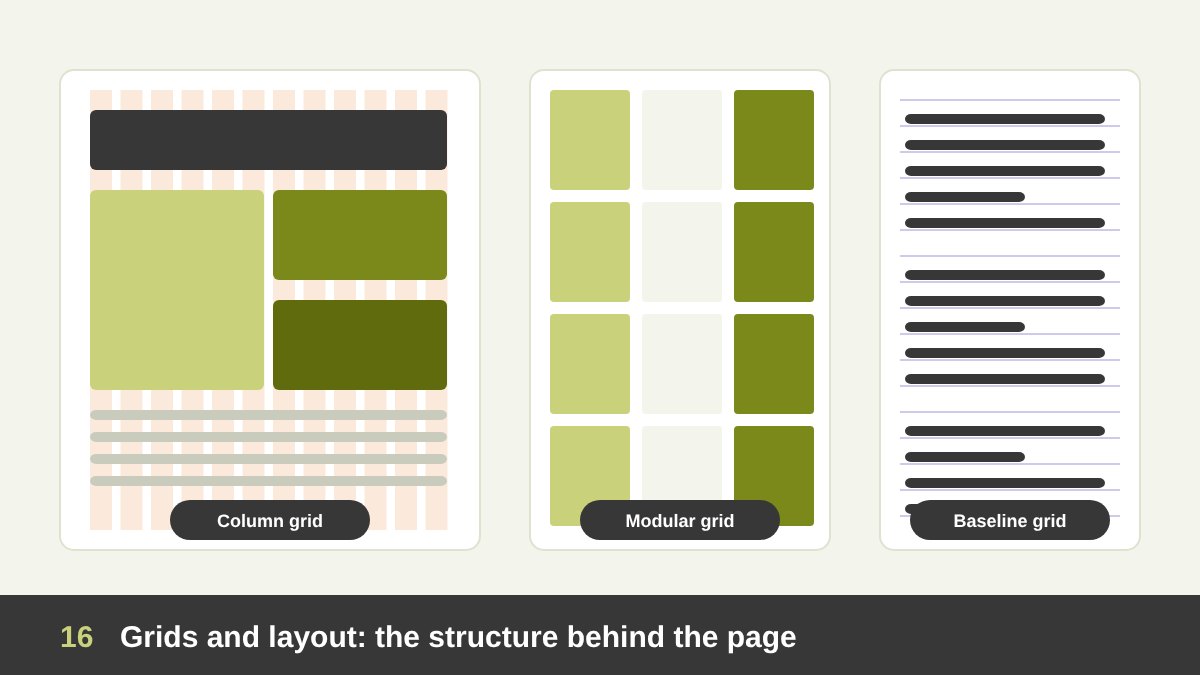
A grid is a set of invisible lines that divides the page into columns, rows and margins, and it is the backbone of most professional layouts. Grids make alignment easy, keep multi-page projects consistent and help teams work together. The idea is very old, from the proportional grids of ancient Egyptian artists to the page canons of medieval manuscripts, and it was perfected by Swiss designers in the twentieth century, such as Josef Müller-Brockmann, whose book on grid systems is still a reference today.
The main types are: the manuscript grid (one large text block, used in books), the column grid (two, three, six or twelve columns, used in magazines and almost every website), the modular grid (columns and rows that form modules, ideal for complex content such as catalogues and dashboards), the baseline grid (horizontal lines that all text sits on, so lines align across columns) and the hierarchical grid, built around the content itself. Learn the parts: margins around the edges, gutters between columns and modules where they cross. On the web, grids must also be responsive: twelve columns on a desktop may become four on a phone. A grid is a tool, not a cage: once it is in place, you can break it deliberately for emphasis.
Typography Fundamentals: Type Is Design
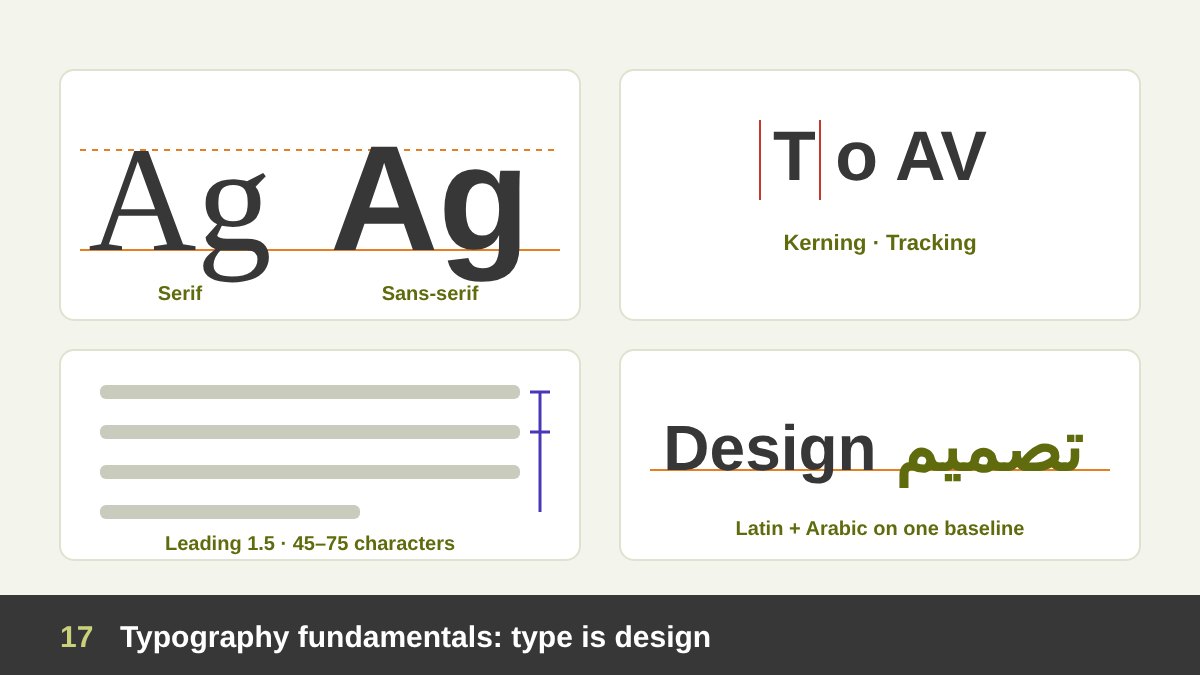
Most designs are mostly text, so typography is not a detail; it is half the job. Start with the basic categories: serif fonts, with small strokes at the ends of letters, feel classic and literary; sans-serif fonts feel clean and modern; script and display fonts add personality but are for short texts only. Choose fonts for their message and their function. A good rule is to use no more than two font families in a project, often one for headings and one for body text, and to build hierarchy with size, weight and spacing rather than with more fonts.
Then control the spacing. Leading (line spacing) for body text is usually about 1.4 to 1.6 times the font size. Tracking is the overall spacing of a word or line; capitals often need a little more. Kerning adjusts the space between specific pairs of letters, such as “AV” or “To”, and is essential in logos and headlines. Keep line length comfortable, about 45 to 75 characters per line in Latin text. Avoid widows and orphans (single words or lines left alone). Know the difference between legibility (can each letter be recognised?) and readability (is a long text comfortable to read?). And in Arabic design, respect the script: Arabic letters connect, have no capitals, need generous line spacing for their dots and vowels, and look best in fonts designed for Arabic, not in automatically generated versions of Latin fonts.
Simplicity and Function: Form Follows Function
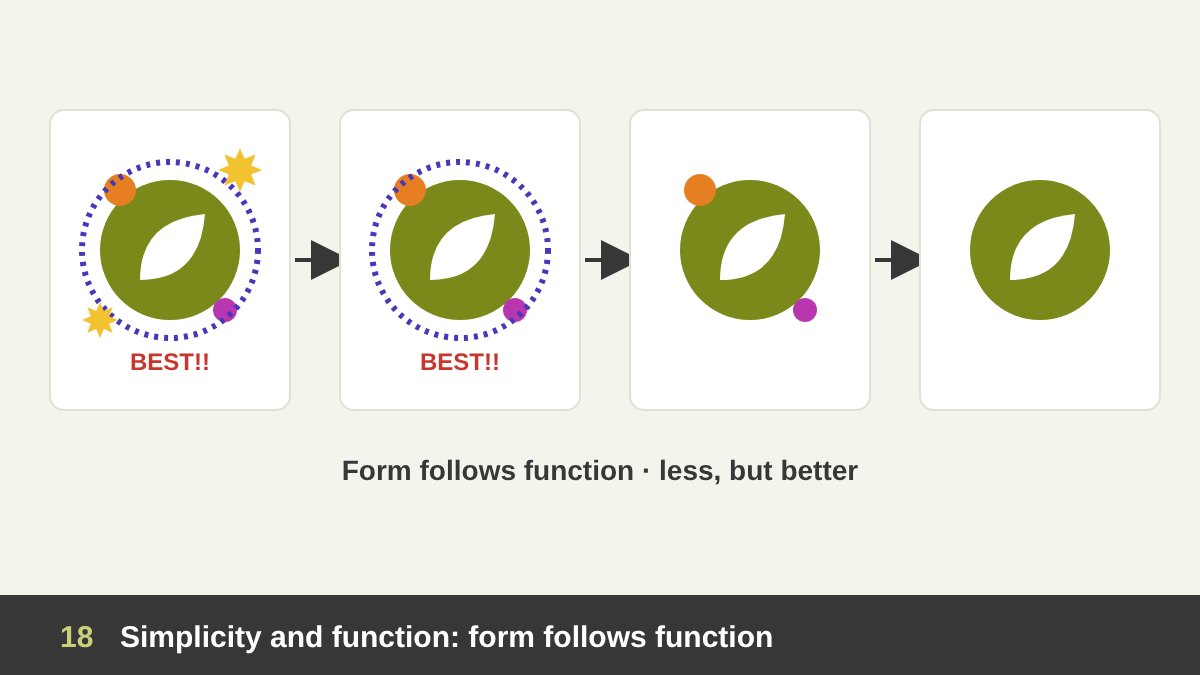
“Form follows function”, a phrase coined by the architect Louis Sullivan, means the shape of a design should come from its purpose. A road sign must be read in one second at high speed, so it is simple, bold and high in contrast. A wedding invitation has a different function, so it can be detailed and decorative. Before choosing a style, ask what the design must do: inform, sell, guide, entertain, or build trust. The answer tells you which principles to prioritise.
Simplicity follows naturally. Dieter Rams summarised his philosophy as “less, but better”, and it remains one of the best tests in design: remove every element that does not help the message, until removing anything else would hurt it. Simplicity is not the same as minimalism as a style; a rich illustrated poster can be simple in its message, and a minimal layout can still be confusing. Simple designs are faster to understand, easier to remember, cheaper to produce and more flexible across sizes, which is why a strong logo must work at every size, from a tiny favicon to a large building sign, as you can see in my Al Malik case study.
Legibility and Accessibility: Design for Everyone
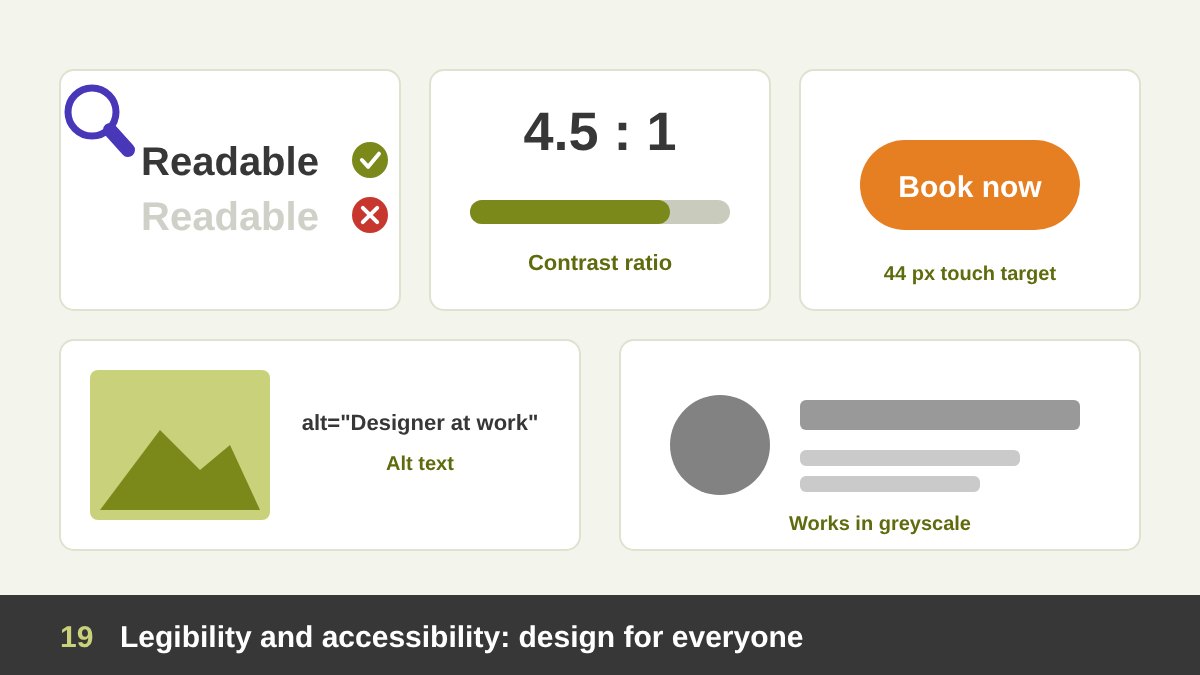
A design that people cannot read or use has failed, no matter how beautiful it is. Accessibility means designing so the widest possible range of people can use your work, including people with low vision, colour blindness, dyslexia or motor difficulties, older users, and anyone using a small phone in bright sunlight. It is not a niche requirement; at some point, it applies to all of us. On the web, the Web Content Accessibility Guidelines (WCAG) give clear targets, such as a contrast ratio of at least 4.5 : 1 for normal body text.
Some basic rules apply to every medium. Keep body text large enough: around 16 pixels on screens, and usually 9 to 12 points in print, depending on the font. Use strong value contrast between text and background. Never use colour alone to show meaning; add a label, an icon or a pattern. Make buttons and links big enough to tap, at least around 44 pixels. Write meaningful alternative text for images on the web. Do not set long texts in all capitals, light weights or decorative fonts. And test your work in greyscale and on a real phone. Accessible design is usually better design for everyone: clearer, calmer and easier to use.
Context, Audience and Purpose: The Principle Above All Principles
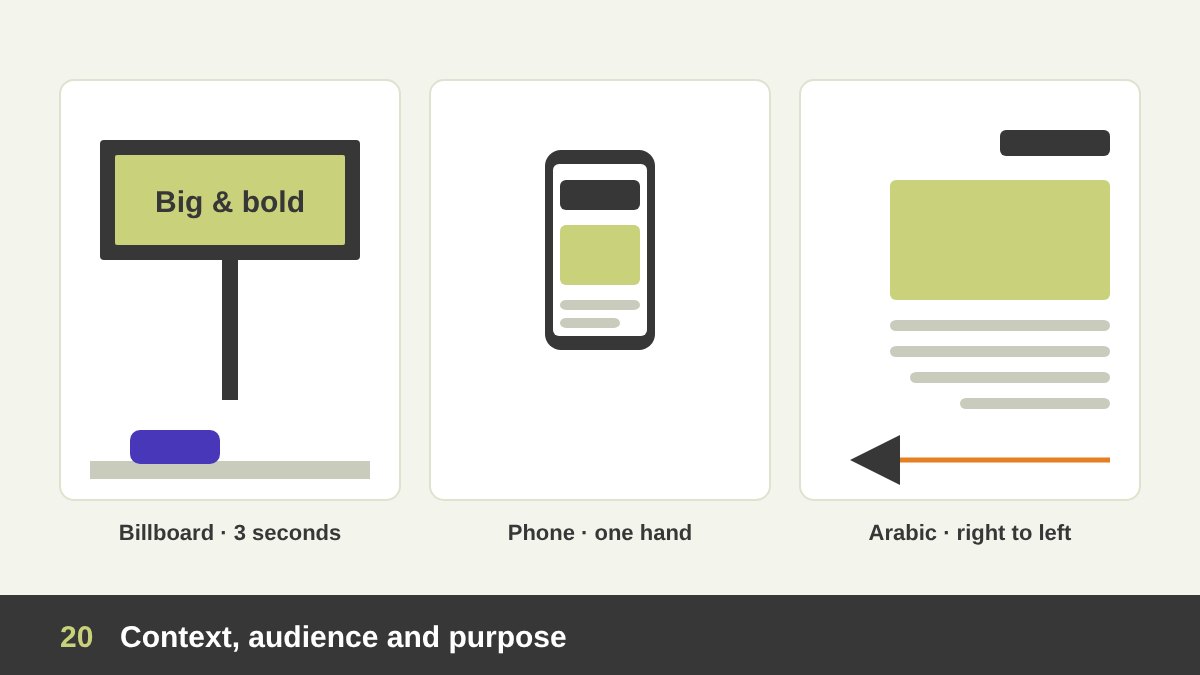
Every principle in this article depends on context. The same headline needs a different size on a billboard seen from a moving car, a phone screen held in one hand and a printed brochure read at a desk. A design for children follows different rules from a design for a bank. A layout for an Arabic audience starts from the right, mirrors the reading flow and needs fonts and spacing that respect the Arabic script. Colours, symbols, gestures and images carry different meanings in different cultures. Before you design anything, you need to understand who it is for, where they will see it, what they should do after seeing it, and what constraints exist: budget, production method, brand guidelines, deadlines and legal requirements.
This is why the brief and the research phase are not optional. Good design is not what the designer likes, and not even what the client likes; it is what works for the audience and achieves the goal. Context also includes the competition: a design that is beautiful but looks exactly like every competitor in the market fails to be noticed. And it includes the medium: an exhibition booth must be understood from ten metres away in three seconds, while a book cover must work as a small thumbnail online. When designers disagree about a design, the argument should always return to context and goals, not to personal taste, which is also the best way to present your design work to clients.
Breaking the Rules, and a Checklist Before You Deliver
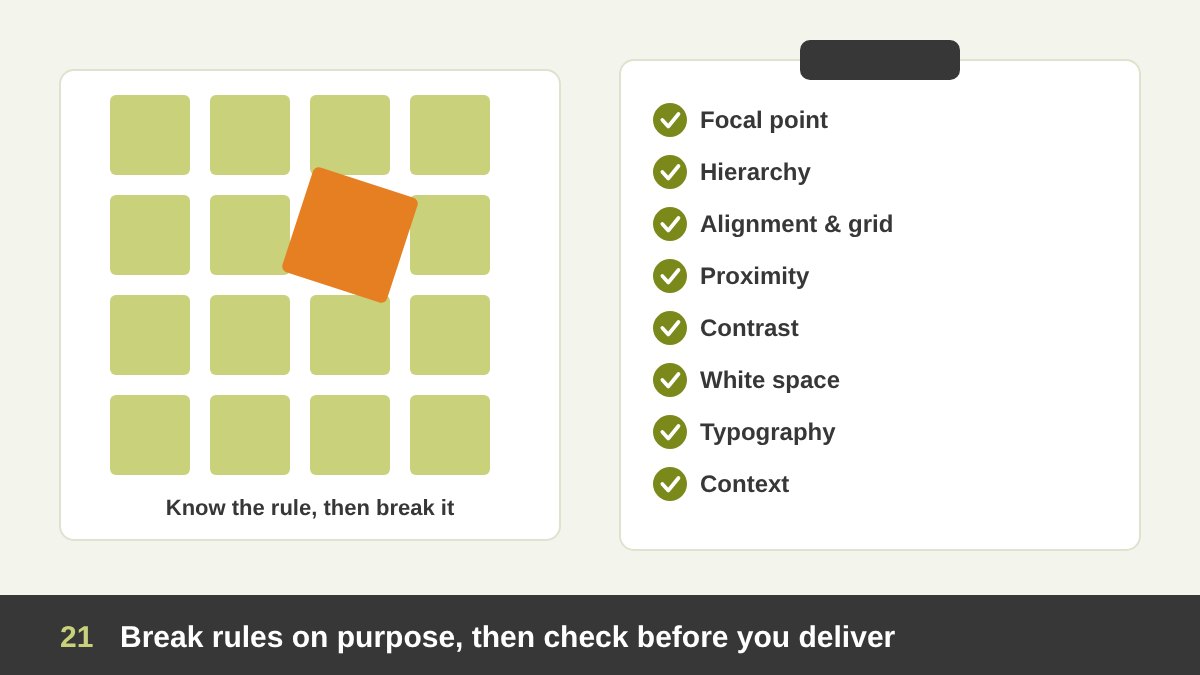
Once you understand the principles of design, you will notice great designs that seem to break them: David Carson’s chaotic magazine pages, posters with almost unreadable type, layouts with no grid at all. These work because the designer knew the rule and broke it on purpose, for a reason that serves the message: to create tension, energy, surprise or a rebellious personality. Breaking a rule you do not know is not creativity; it is just a mistake that sometimes looks interesting. Learn the rules first, use them until they become instinct, and then break one at a time, deliberately, while keeping the others strong.
Before you send any design to a client or to print, run through this quick checklist. Focal point: is there one clear first thing to see? Hierarchy: is the reading order obvious? Alignment and grid: does every element line up with something? Proximity: are related items grouped and unrelated items separated? Contrast: are differences strong enough? Consistency: are fonts, spacing and styles repeated? White space: can the design breathe? Typography: is the text legible and comfortable to read? Accessibility: does it work in greyscale and on a phone? Context: does it speak to the right audience and achieve the goal? If you want a designer who thinks about all of this for your brand, see my portfolio or get in touch.
| Principle | What it does | Quick test |
|---|---|---|
| Balance | Distributes visual weight so the layout feels stable | Squint: does one side feel heavier without a reason? |
| Contrast | Makes differences clear and important things visible | If two things are different, are they clearly different? |
| Emphasis | Creates one focal point | What is the first thing you see? |
| Hierarchy | Sets the reading order | After 5 seconds, what does a viewer remember? |
| Alignment | Connects elements with invisible lines | Does every element line up with something? |
| Proximity | Groups related items, separates the rest | Is the space between groups larger than within them? |
| Repetition | Builds consistency and brand recognition | Cover the logo: is the brand still recognisable? |
| Rhythm | Moves the eye with a visual beat | Does long content feel varied, not monotonous? |
| Movement | Guides the eye along a planned path | Does anything pull the eye out too early? |
| White space | Gives focus, clarity and a feeling of quality | Can the design breathe? |
| Scale and proportion | Creates drama and harmony between sizes | Are sizes decided by a system, not guessed? |
| Unity and variety | Makes parts feel like one design, with interest | Do all fonts, icons and images belong together? |
| Gestalt | Uses how the brain groups what it sees | Does the brain see the groups you intended? |
| Grid | Gives structure and consistency | Is there a clear column structure? |
| Typography | Makes text readable and expressive | Is the line length, spacing and size comfortable? |
| Simplicity | Removes everything that does not help the message | Can anything be removed without loss? |
| Accessibility | Makes the design usable for everyone | Does it work in greyscale and on a phone? |
| Context | Fits the audience, culture, medium and goal | Who is it for, and what should they do next? |
Principles of Design: Frequently Asked Questions
What are the main principles of design?
The most commonly taught principles of design are balance, contrast, emphasis, hierarchy, alignment, proximity, repetition, rhythm, movement, white space, scale and proportion, and unity. Many designers also include the Gestalt principles, grids, typography, simplicity, accessibility and context, which this guide covers too.
What is the difference between the elements and the principles of design?
The elements are the basic parts of a design: point, line, shape, form, texture, value, space, type and colour. The principles are the rules for arranging those elements, such as balance, contrast and hierarchy, so the design communicates clearly.
Which principle of design is the most important?
There is no single most important principle, because they work together. For most practical projects, hierarchy and contrast are a good place to start, because they decide what the viewer sees first and how they read the rest. Context comes before all of them, because it tells you which principles matter most.
What are the Gestalt principles in design?
The Gestalt principles describe how the brain groups what it sees into wholes. The main ones are proximity, similarity, continuity, closure, figure-ground, common region, common fate and symmetry or simplicity (Prägnanz). Designers use them to group content, create clear layouts and design logos with hidden or double meanings.
Can a designer break the principles of design?
Yes, but only on purpose. Breaking a rule can create tension, energy or surprise when it serves the message. It works best when the designer understands the rule well and breaks one principle at a time while keeping the others strong.
Why is colour theory not covered in this guide?
Colour is one of the elements of design, and colour theory (the colour wheel, harmonies, contrast and the psychology of colour) is large enough to need its own guide. It will be covered in a separate article on this blog.
Leave a Reply